Showing posts with label Digital Camera. Show all posts

Friday, December 04, 2009

Canon PowerShot SD1200 Digital Camera

I have always had good experiences with Canon cameras and the Canon PowerShot SD1200 is no exception. This 10-megapixel camera is small, lightweight, very easy to use and produces some really great pictures. The only downside is that like a lot of Canon point-and-shoot cameras, there is a noticeable camera lag, though it has been greatly improved since their earlier models.

Read my full review of the Canon PowerShot SD1200 on Epinions

Sunday, October 18, 2009

FUJIFILM FinePix Z33WP 10-Megapixel Waterproof Digital Camera

After several years of good service, it was time to replace my old FujiFilm FinePix A500 digital camera. It wasn't a perfect camera, but it lasted for quite a while and produced decent shots. That's why when I started looking for a replacement, I was drawn to the newer line of FujiFilm cameras.

At first I was interested in the Tough line of digital cameras from Olympus, but their very large price markup and lackluster reviews led me back to the FujiFilm cameras and eventually to the FinePix Z33WP 10-megapixel Digital Camera. This camera had many of the features of the Olympus Tough line (such as being waterproof and weather resistant) at a much lower price than the Olympus cameras. Plus having had a FujiFilm camera, I figured I knew what to expect - something that wouldn't blow you away, but that would be easy to use and would produce decent pictures that are fine for what I would expect in a simple point-and-shoot camera that I would be using as my knock-around camera.

Read my full review of the FujiFilm FinePix Z33WP Digital Camera on Epinions

Sunday, February 01, 2009

Canon PowerShot A570 IS 7 Megapixel Digital Camera

I've been hemming and hawing on upgrading from the point and shoot camera that I currently have to something with greater resolution and more options. As part of that quest I was able to get my hands on my good friend's Canon PowerShot A570 IS 7.1 mega pixel digital camera for several weeks to try it out. I was also able to get her up to speed with the camera so that she could get the most out of it as possible before and after, since she had gotten the A570 last year, but continued to use her older Kodak digital except for ocassionally using this one.

My first impression of the A570 was that it didn't look all that different from the PowerShot A75 I had gotten my partner several years ago. It was a bit more compact and lightweight, but overall the PowerShot has retained the same shape and general size as the line has evolved. That said, the number of features and functions has changed dramatically except for the one thing I always hated about our A75, which is still present with the A570. There is a significant shutter lag for most photos, especially in low-light conditions.

Read my full review of the Canon PowerShot A570IS 7-Megapixel Digital Camera on Epinions

Thursday, May 22, 2008

Canon PowerShot A75 Digital Camera

The Canon PowerShot A75 is a good introductory digital camera for people who want a point-and-shoot digital camera that has enough resolution for prints up to 8x10 and for people who are looking for a good combination of value and capability.

I’ve found that the Canon PowerShot A75 is a good combination of resolution, features and value for anyone looking for an all-purpose digital camera. You won’t get the latest and greatest features and you might not be able to produce a poster size print, but you’ll get good battery life, an adequate zoom and an easy-to-use camera that’s great for beginners.

Saturday, March 15, 2008

Canon BP-511 Battery

In order to make sure I never run out of battery power when I’m using my Canon Digital Rebel camera, I carry a spare, charged battery with me. That way if the battery that’s in the camera runs out of power, I can swap in the charged one and continue taking photographs.

When I was looking for a battery backup, I went and just got a second BP-511 battery from Canon. I wanted to make sure that it was fully compatible with the camera and that I was getting a quality battery that wouldn’t lose its charge or have other problems.

Read my full review of the BP-511 Battery from Canon on Epinions

Friday, October 06, 2006

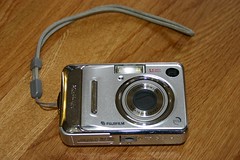
Fuji FinePix A500 Digital Camera

Fuji FinePix A500 Digital Camera

If you want a small, inexpensive, 5.1 mega-pixel digital camera and you don’t mind sacrificing a bit on sharpness and focus, then you probably will enjoy the Fuji FinePix A500.

At its most basic, the FinePix A500 is a small, easily carried, 5.1 megapixel digital camera that uses 2 AA batteries for power, stores images on either 12 megabytes of internal memory or on an xD memory card, has a 1.8 inch LCD monitor, offers a 3x optical zoom lens and can record video without any sound.

The problems are in the details though and my experiences with this camera have been less than perfect, but not so bad that I’m ready to get rid of the camera. The major issues I’ve discovered over time have been with the clarity of the photos and the focusing ability of the camera. More often than not, I find myself taking multiple photos of the same thing, hoping that at least some of them will come out as clearly and as sharply as possible, knowing that at least some of them will be blurry or out of focus.

Read my full review of the Fuji FinePix A500 Digital Camera on Epinions

Friday, February 10, 2006

Olympus Camedia C-4000 Zoom Digital Camera

Did I really need a new camera? I only already have two 35mm ones and already had a digital camera. But I was feeling the need. After plenty of research and cost comparisons, I went with the Olympus C-4000. It helped that my old digital camera was an Olympus and I had excellent experience with it (and continue to do so).

Of course everyone, including my boyfriend just rolled their eyes at me and went “do you really need a new camera?” Just like they all said when I wanted a new cell phone. Oh the life of someone who enjoys these kinds of things. No one else seems to understand your needs.

The C-4000 is a 4.1 mega-pixel camera with a zoom lens. I’d like to think of it as sort of a “hybrid” camera type, not quite point and shoot, but not quite an SLR either (no interchangeable lenses for example, but it does have some manual controls). It gives someone who wants to do more than just snap photos quite a few options to play with and work with.

Read the entire review at Epinions.com

Thursday, February 09, 2006

Canon PowerShot A75 3.2 Megapixel Digital Camera

The Canon PowerShot A75 is a good introductory digital camera for people who want a point-and-shoot digital camera that has enough resolution for prints up to 8x10 and for people who are looking for a good combination of value and capability.

I’ve found that the Canon PowerShot A75 is a good combination of resolution, features and value for anyone looking for an all-purpose digital camera. You won’t get the latest and greatest features and you might not be able to produce a poster size print, but you’ll get good battery life, an adequate zoom and an easy-to-use camera that’s great for beginners.

How’d I get this camera…

After attempting to satisfy my boyfriend with various 35mm and APS point-and-shoot cameras, it was finally time introduce him to the digital realm. Perhaps it was the stack of undeveloped film he had, or the fact that he was always saying “if I had a digital camera like you did, I’d take a lot more pictures…” Now how could I fight that?

So when his birthday was about to roll around a few months ago, I started shopping for a digital camera for him. I started looking at 4-megapixel models like I have, but I soon realized that they were still pretty pricey and he didn’t need the resolution or all the features that were on a lot of these models. So it was down into the 3-megapixel range and what really won me (beyond a couple of reviews here) was the Canon name, along with the price. I purchased this camera on Dell.Com for about $230.

Basics

While basically a point-and-shoot camera, the A75 does offer quite a few features for users. Most beginners will probably pass them up for the point-and-shoot simplicity, but as you get more involved with the camera, it’s nice to know there are those additional options to work with.

This camera isn’t the latest and greatest. There are 8-megapixel point-and-shoot cameras available nowadays. However what the A75 is, is a well-made, well-rounded, and eminently usable camera that should satisfy the average user (beginner and up) for quite some time. You won’t be able to print out super-large prints and you might not have all the features of the newest cameras, but the A75 won’t be going out-of-date anytime soon.

Resolution
The Power Shot A75 is a 3.2 megapixel point-and-shoot digital camera. The A75 lets you choose several different resolutions though, from the full 3.2 megapixels, all the way down to 0.3 megapixels (640x480 resolution). You can choose both image size (2048x1536 down to 640x480) and the jpg compression mode (superfine, fine and normal). There’s no option to take raw images, they are always in the jpg format. The A75 doesn’t support any other image formats.

A full resolution, superfine photo will take up about 1.6 megabytes worth of memory, while the lowest resolution 640x480 photo will only take up 84 kilobytes of memory. In the real world that means you can get about 150 high-resolution images on a 256 megabyte memory card and over 2,000 lowest-resolution images on the same card.

At the highest resolution, prints are acceptable up to 8x10. Any prints larger than that will start to show distortions. Your basic 3x5 and 4x6 prints are generally of excellent quality with the higher resolutions. With the low resolutions, you’d only get away with putting the pictures up on the web or using them in email, they are not good enough to print anything of any size.

Size & Weight
The A75 seems like a feather compared to the older digital cameras that I have. When I first picked it up I was amazed at how small it was and how light it was. Now saying that, it’s not a feather, but compared to some cameras, it is fairly small and light.

The camera measures about 2 � inches high, 4 inches wide and a little over an inch deep. With the batteries and the memory card, the camera weighs in at around 9 ounces. Definitely not something you’d be able to not notice in your pocket, but something that could go in your pocket without too much effort.

LCD Screen, Viewfinder & Controls
The A75 has a bright 1.8 inch LCD view screen in addition to the basic see-through viewfinder. You can access the menus and various functions of the camera through the viewscreen. It has as fairly basic button setup on the back of the camera that allows you to quickly get to the menu or function your looking for. When you’re navigating, there’s a 4-direction (up, down, left and right) button that you can use to move through the menus.

The menus are fairly intuitive. Before I had read the manual I had managed to figure out the basic features of the camera and had been able to change a few settings. However to be honest, I’ve played with and used plenty of digital cameras, so someone without any experience will likely need to look at the manual and will probably need to spend some time getting through the various functions and menus.

Image Storage
In order to save photographs, the A75 uses CompactFlash memory cards. These are available in sizes from about 32 megabytes to over several gigabytes. Most users of the A75 will probably be happy with one or two 256-megabyte CompactFlash memory cards. At the highest resolution, you can store about 150 pictures per 256 megabytes.

Battery Life
The A75 uses four AA batteries for power. If you have rechargeable batteries, they have to be charged outside the camera, it doesn’t have any method for directly charging batteries.

Canon says you can get around 800 photographs if you don’t use the LCD screen and somewhere around 250 shots if you are using the screen. Since most of us don’t always keep the LCD screen on or off, you’re going to fall somewhere in between. For my boyfriend and I, after about 400 shots we had to replace our first set of four AA batteries.

Zoom & Focus
There is a 3.0x standard zoom on the A75. There’s also the option for a digital zoom, but as you’ve probably heard – that doesn’t really mean much. All it does is blow up pixels and the resulting photo is pretty bad. So stick with the regular zoom and with the A75’s 3.0x zoom lens, you won’t be photographing wild lions on the savanna from 200 yards away, but it will come in handy for composing photographs.

As you’d expect with any camera today, the A75 has an autofocus system. It uses 9-fixed points to focus. We’ve been generally satisfied, though a few times the camera has focused on the wrong object in a picture, but that is as much us not paying attention when taking the photo as the camera’s fault. There is a focus-lock on the camera, so you can depress the shutter halfway to lock the focus, then hold the button and move the camera to reorganize the shot. Once you’re set, just depress the button the rest of the way and the camera will take the picture with the focus set on the original object.

Movies
The A75 can take movies in 3 different resolutions, 640x480, 320x240, and 160x120. The length of the movie is limited by the size of your memory card and a Canon imposed 3-minute cut-off for movies. With the movies you’ll get both picture and sound.

Other Stuff
The A75 has a built-in flash that can be used in automatic mode, red-eye reduction mode, as a fill-flash and turned off.

There are built-in photo taking “modes” in the A75. These include auto, creative, portrait, landscape, night scene, fast shutter, and slow shutter. There are also special scene modes that include modes for foliage shots, snow shots, beach photos, pictures of fireworks, underwater pictures and indoor photos.

You can playback images on the LCD screen either one at a time, in an thumbnail index, or as a slide-show. You can also zoom in on images on the LCD screen to see if you’re happy with the image.

The A75 can be directly connected to a computer or a printer via a USB connection. The A75 also supports the PictBridge standard, which allows for images to be printed directly to a printer without a camera.

There’s software for both the PC and the MAC that comes with the A75. PC software includes ARCsoft photo software, which is a basic photo software program that should satisfiy beginners. More advanced users will probably upgrade quickly to a stronger program.

The camera takes about 4 to 5 seconds to turn on and be ready to take a photograph after you press the power button. Shutter-lag is noticeable, about a second or so, and you need to hold the shutter button down until the camera takes the picture, otherwise you run the chance of not taking the picture. Write time to the memory card depends upon the resolution, but even at the maximum resolution, you shouldn’t be waiting more than 2 or 3 seconds for a the camera to be ready to take the next photograph.

You can have sound effects while you use the camera. The shutter (picture taking) sound when you depress the shutter button can be quite helpful, as it lets you know when the picture has been taken. It’s on by default, but you can modify the sound settings later if you don’t want to be bothered with the noise, or are in a place where you need to be quiet.

In the Box
In addition to the A75, you’ll get:

A wrist strap
AV Cable
Interface Cable
Two CD-Roms, one with the Arcsoft software and the other with drivers for the camera
A 32-megabyte CompactFlash memory card
4 AA alkaline batteries

Experiences

Like I said, I got this camera for my boyfriend, a digital camera newbie who probably had only ever pushed the shutter button on one of my cameras a few times at the most. I needed something easy and simple for him to use, but also advanced enough so he wouldn’t tire of it quickly.

The A75’s been keeping him happy and he’s been taking a lot more pictures. It started with our Vegas trip this summer, he had it with him all the time. Picture taking is quick and easy – push the power button and within a few seconds the camera is ready to go. Then you just look through the viewfinder and press the shutter key.

Shutter lag is noticeable, as some shots will go past the typical second or so, and it’s the first thing he noticed when he was using it. I had to explain that all digital cameras are like that and you just need to get used to it. With the A75 it’s best to plan the shot, then hold the shutter until you hear the shutter sound that the camera produces. At first I had turned off the sound effects, but I realized, especially for a beginner like my boyfriend, that faux-shutter sound really helped when taking pictures. When you hear the click, you know the picture is taken.

I find that we really just use the “auto” setting for the photographs. The other pre-set modes can be helpful, but for general-purpose photographs, nothing beats the standard “auto” setting. One problem I’ve noticed with the modes – they are selected with a small dial on top of the camera, it’s easy to hit this and change modes without realizing. If this happens, you could get a lot of messed up photographs without realizing it. For example if you accidentally get it in portrait mode, most standard photographs will be out of focus and if you’re trying to get an action shot, it’ll be impossible.

I don’t have a pictbridge compatible printer, so I haven’t sent photographs directly to my printer. In addition, the photosmart printer that I have, has a CompactFlash memory card slot, so I haven’t directly downloaded photographs from the camera to the computer – instead, I’ve used the card reader in the printer to download. This is also easier for my boyfriend – all he does it pull out the memory card and slide it into the printer, no cables or anything to fight with or get confused with.

Thoughts

Most beginners should stick to the standard “auto” setting for just about everything on this camera. You’ll get clean, clear and detailed images from the A75 that are good for prints up to 8x10. You will also have an all-around great camera for point-and-shoot photography.

The camera itself is small enough to fit (almost comfortably) in your pocket. This is great for people who want to take it everywhere with them.

For people who’ve moved beyond the beginner stage, there’s enough versatility built into the A75 to keep you busy for a while – plus the camera won’t go out-of-date anytime soon and should provide several years of picture taking.

So…

If you’re not planning on printing out posters and you’re not looking for the newest, latest and most fantastic digital camera on the planet, you should be happy with the Canon PowerShot A75. It’s an excellent beginners camera that produces quality prints up to 8x10, that’s easy to use, and is also versatile enough to grow with users as they progress out of just being a beginner.

Originally published on Epinions.com